
Watch together: screen sharing in a 3D cinema
To watch together on Micup (micup.gg), one person shares their screen or camera and everyone else opens it with "Watch" on a 3D room's TV or on the big screen in the Cinema room. Everyone sits in the same room as avatars and talks by voice while watching; screen sharing is free, and Micup Plus unlocks higher quality options. Only share content you have the right to share.
Last updated:
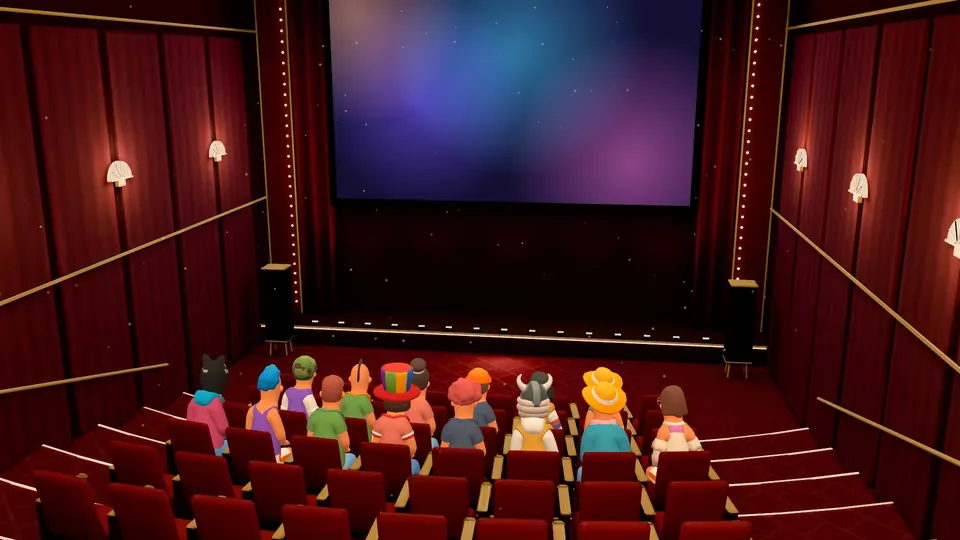
How do you watch together, step by step?
Nothing plays on the screen until you press "Watch"; entering the room does not start the stream on its own.
- Give a voice channel in your server the Cinema theme, or pick a room with a TV: Night Lounge, Coffeehouse or Game Room.
- Join the voice channel with your friends; everyone lands in a free seat.
- The person sharing starts a screen share or turns on their camera.
- Everyone else presses "Watch" on the big screen or TV, and anyone can enlarge it with "Full screen".
- Talk while you watch, send emoji reactions, or type in the room chat box.
How does a screen share show up on the 3D cinema screen?
Cinema is a 3D hall with 54 seats and a projector beam. Someone's screen share or camera plays on its big screen; you look at it from your seat, or press V to see it through your character's eyes.
In Night Lounge, Coffeehouse and Game Room the same picture plays on the room's TV, so one person can show a game or a presentation while the others comment from their seats.
What quality is the shared picture?
Actual quality depends on your connection and device. A server boost can also unlock higher options for free accounts in that server.
| Aspect | Free | Micup Plus |
|---|---|---|
| Resolution | Up to 720p | Options up to 1080p, 1440p and 4K |
| Frame rate | 15 or 30 fps | Up to 60 fps |
| Price | Free | 1 month 1.99 USD, 3 months 5.37 USD, 12 months 19.13 USD; one-time or subscription |
What content can you share?
Only share content you have the right to share: your own videos, your game, your slides, or a stream you have permission to show. The Terms of Use treat sharing films, series, music, software, games or images you do not hold the rights to as copyright infringement and prohibit it.
Frequently asked questions
Can we talk while we watch?
Yes. Everyone is in the same voice channel, so you talk while watching. With 3D audio on, each friend's voice comes from their spot in the room.
Do my friends need to install anything?
No. Micup opens in the browser without installing anything, and there is also a desktop app. The 3D room runs on computers; friends joining from a phone don't see the 3D room and join the same voice channel in the flat view.
How many people can watch together?
There is no 3D-specific cap on people. The Cinema room has 54 seats; up to 48 characters are drawn on screen and the rest show as profile pictures.
Does watching together cost anything?
No. Screen sharing and 3D rooms are free. Micup Plus adds higher resolution and frame rate options for screen sharing.
Get Micup
3D rooms and table games open on computers, in the browser and the desktop app.