
What is 3D chat?
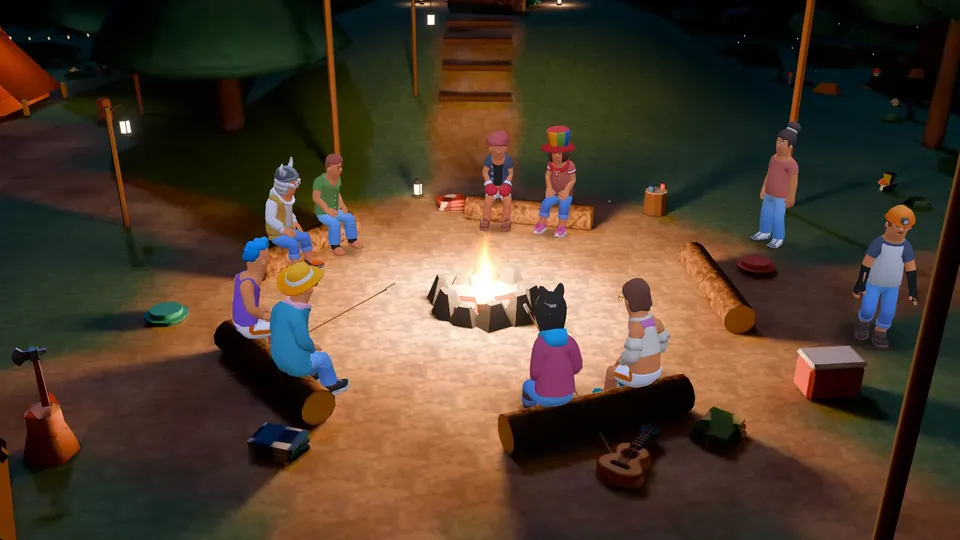
3D chat is a form of online conversation where people share the same virtual room as avatars and talk by voice or text in real time; Micup (micup.gg) offers it as 3D rooms inside server voice channels. The difference from ordinary voice chat is that participants appear as characters with a place in the room instead of names in a list, and each voice comes from that place; on Micup it does not need a VR headset.
Last updated:
How is 3D chat different from 2D voice chat?
In 2D voice chat, the people in a channel appear in a list or as camera tiles, and every voice comes from the same place.
| Aspect | 2D voice chat | 3D chat (on Micup) |
|---|---|---|
| How people appear | A list of names or camera tiles | 3D characters sitting or walking in a room |
| Where voices come from | The same place for everyone | The speaker's spot in the room |
| What you can do | Talk, type, react with emojis | All of that, plus sitting, walking, emotes and board games |
| Screen sharing | A tile in the call screen | On the room's TV or the cinema screen |
How is 3D chat different from social VR apps?
Social VR apps are designed for a virtual reality headset, where turning your head turns your view. 3D chat brings the shared room to an ordinary screen.
Micup's 3D rooms are used with a mouse and keyboard, open in the browser or the desktop app, and do not require installing a separate game. Micup does not support VR headsets.
How does 3D chat work on Micup?
Someone with permission to manage the channel gives a voice channel one of five themes: Night Lounge, Coffeehouse, Campfire, Game Room or Cinema. Everyone who joins appears as a stylised 3D character in a free seat.
While you talk, your character moves its mouth with your voice. With 3D audio on, each voice comes from the speaker's direction; when someone walks away their voice gets up to 9 dB quieter, but nobody becomes inaudible.
The 3D room opens on a computer with a WebGL2 browser. If the device cannot run it, the same voice channel opens in the flat view and the conversation keeps going.
Which terms come up in 3D chat?
| Term | Meaning | On Micup |
|---|---|---|
| Avatar | The character that represents you in the room | A stylised 3D character dressed from 9 outfit slots |
| 3D audio | Voices coming from the speaker's position | On by default, can be turned off in the toolbar |
| Room theme | Which 3D room a voice channel opens in | Set in channel settings: 5 rooms or "None" |
| Emote | A short movement your character performs | Wave, dance, jump, crouch, a joke punch, faint |
| Reaction | An emoji that pops up over your character | 8 quick emojis plus the server's own emojis |
| Flat view | The same call without the 3D room | Switch any time; opens on its own if the device cannot run 3D |
Is 3D chat safe, and is there an age limit?
You must be at least 15 to use Micup, or older where local law requires. Users aged 15 to 17 use it with a parent or guardian's consent, and their accounts get stricter settings by default.
Frequently asked questions
Do you need a VR headset for 3D chat?
Not on Micup. 3D rooms are used on a normal screen with a mouse and keyboard, and VR headsets are not supported.
Does 3D chat work on a phone?
Not on Micup. 3D rooms open on a computer, in the browser or the desktop app; on a phone you join the same voice channel in the flat view.
Is 3D chat the same as a 3D hangout or avatar voice chat?
They describe the same idea: people meeting as avatars in a shared 3D space. On Micup the talking happens by voice.
Get Micup
3D rooms and table games open on computers, in the browser and the desktop app.