
How do anime communities use Micup?
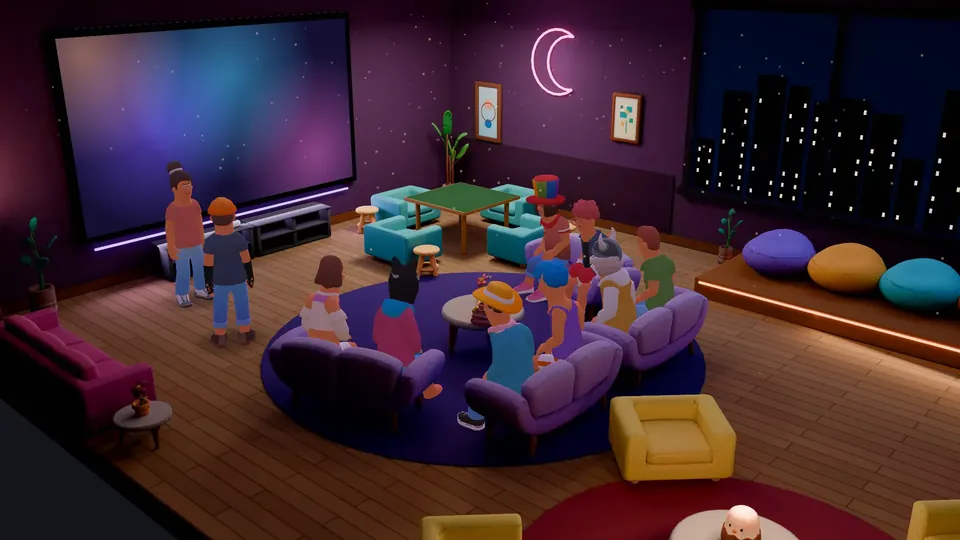
Anime communities use Micup (micup.gg) for episode discussion, spoiler-safe channels, fan art and voice hangouts, with spoiler tags for text and a spoiler option for images. For watch sessions, someone shares their screen in a 54-seat 3D Cinema room while everyone talks, as long as the person sharing has the right to show what is on screen.
Last updated:
Which channels should an anime server have?
| Channel | Type | What it is for |
|---|---|---|
| airing-this-season | Text | One place per season for new episodes; turn on slowmode on premiere nights |
| episode-discussion | Text | Talk about the latest episode; rule: anything past it goes in spoiler tags |
| manga-chapters | Text | For readers who are ahead of the anime, with spoilers tagged |
| recommendations | Text | What to watch next; react with emoji to agree |
| fan-art | Text | Drawings and edits; mark images as spoilers when they show later plot |
| cosplay | Text | Photos and builds, with a content warning if the channel needs one |
| Watch room | Voice, Cinema theme | 54 seats and a big screen for screen-share sessions |
| Hangout | Voice, Night Lounge theme | Everyday voice chat with 20 seats and a TV |
How do spoiler tags work on Micup?
Put two vertical bars on each side of the text, like ||the twist||, or select the text and press the "Spoiler" button in the message box. The text stays hidden until each reader clicks it.
For images, mark the attachment as "Spoiler" before you send it; it stays covered until someone clicks "Reveal spoiler". Pin a message with the spoiler rules so new members see them first.
How do you run a watch session?
Free accounts share at up to 720p and 30 fps; Micup Plus adds an option of up to 4K and 60 fps, and actual quality depends on your connection and device. Only share episodes you have the right to show: the Terms of Use treat sharing series or films without the rights as copyright infringement.
- Give a voice channel the Cinema theme under "Room theme" (this needs Manage channels).
- Everyone joins the channel on a computer and takes a seat as their avatar.
- The host starts a screen share; the others press "Watch" on the big screen and can switch to "Full screen".
- Talk while you watch, react with emoji, or type in the room chat box. Press V to look at the screen through your character's eyes.
How do roles and expressions help a fan server?
- Members pick roles for the series they follow from a Community bot reaction role panel.
- Switch on "Allow mentions for this role" so a new-episode post can ping only the fans of that show.
- Members with "Create emoji & stickers" can upload your server's own emoji and stickers.
- A channel-level content warning ("Show a content warning in this channel") covers channels with mature fan art. Accounts of users under 18 start with spaces meant for adults turned off.
What are the limits for anime communities?
- Micup does not provide anime episodes and has no built-in shared video player. Watch sessions are screen shares.
- 3D rooms, including Cinema, open only on computers. Members on the Android app or a phone browser join the same voice channel in the flat view.
- Micup accounts are for people aged 15 and over, or older where local law requires.
Frequently asked questions
Can we watch anime together on Micup?
Yes, through screen sharing. One person shares their screen in a voice channel, ideally with the Cinema theme, and everyone else presses "Watch". Only share episodes you have the right to show.
How do I hide spoilers in a message?
Wrap the text in two vertical bars on each side, like ||this||, or select it and press "Spoiler". For images, mark the attachment as a spoiler before sending.
Can we have our own emoji and stickers?
Yes. Members with the "Create emoji & stickers" permission upload them under Community settings, in the Emoji and Stickers tabs.
Does the Cinema room work on my phone?
No. The Cinema and the other 3D rooms open on a computer, in the browser or the desktop app. On a phone you join the same voice channel in the flat view.
Get Micup
3D rooms and table games open on computers, in the browser and the desktop app.