
How do creators use Micup?
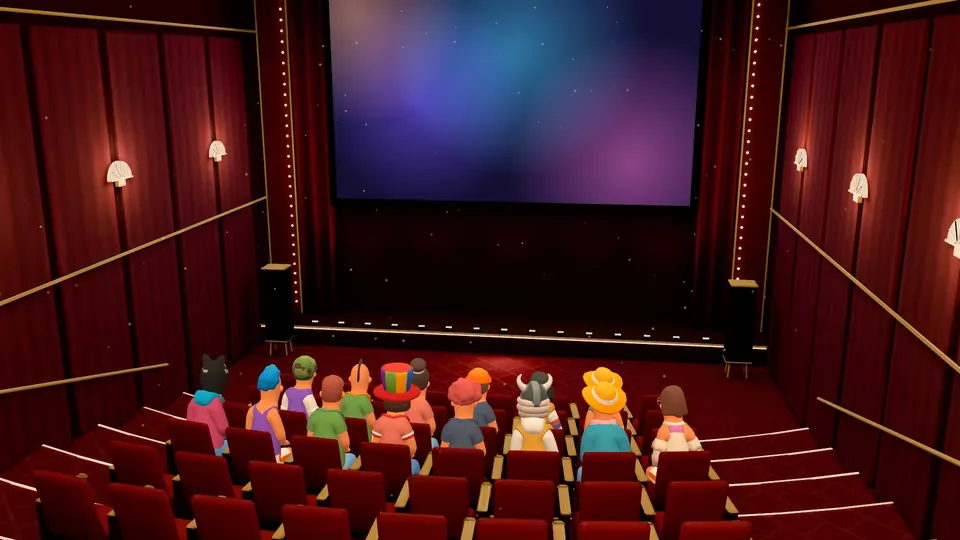
Creators use Micup (micup.gg) to give their audience a place to gather: a server where fans chat and hang out in voice, plus Feed posts that everyone who follows them sees. Micup is not a broadcasting platform like Twitch or YouTube, so you keep streaming where you already stream and use Micup for the community around it, including live screen-share sessions and Q&As in a 54-seat 3D Cinema.
Last updated:
Which channels should a creator server have?
| Channel | Type | What it is for |
|---|---|---|
| announcements | Text | New videos, stream times and news. Turn off "Send messages" for everyone so only you and your mods post. |
| my-channel | Link | A shortcut in the channel list to where you stream or publish. |
| general | Text | Fan chat. Add slowmode when it gets busy. |
| fan-art | Text | Fans share their work; images can be marked as spoilers. |
| suggestions | Text | Video and stream ideas; fans react with emoji to vote. |
| supporters | Text, private | Only the roles you pick can see it, for example a supporter or moderator role. |
| Hangout | Voice | Drop-in voice chat with the community. |
| Live room | Voice, Cinema theme | Screen-share sessions and Q&As with 54 seats around a big screen. |
How does the Feed work for creators?
The Feed is Micup's timeline of posts. A post can hold text with up to four images, or a poll. Fans follow you with the Follow button on your posts, and your posts then appear in their People you follow tab; popular public posts also show up in the Discover tab.
Posts show like and comment counts, people can comment, and a post that breaks the rules can be reported.
How do you run a live session on Micup?
- Join your Live room and start a screen share or turn on your camera. Fans press "Watch" on the Cinema big screen.
- Give yourself "Priority speaker" so you can be heard over the room while holding the priority key.
- For a Q&A, turn off "Use voice activity" for everyone, so fans speak with push-to-talk, and let mods use "Mute members" when needed.
- Free accounts share at up to 720p and 30 fps. Micup Plus adds an option of up to 4K and 60 fps; actual quality depends on your connection and device.
How do you keep a big fan server under control?
Under Community settings › Moderation you set the member verification level (None, Low, Medium or High, from a verified email up to a 10-minute wait after joining), the explicit content filter, and whether moderators need two-factor authentication for moderation actions.
The Community bot adds automod rules for spam, invite links, outside links, blocked words, mass mentions and capital letters. Each rule can delete the message, delete and warn, or delete and time out, with roles and channels you exempt.
How does streaming privacy protect you on stream?
Settings › Appearance › Streaming privacy masks private account details such as your email, linked accounts and notes, masks community invite links, mutes app sound effects and pauses notifications. In the desktop app it can turn on by itself when OBS or XSplit is detected.
What are the limits for creators?
- Micup has no stream key or RTMP input; going live on Micup means a screen share or camera in a voice channel.
- Voice and video are not recorded, so there are no replays of a session.
- Only share content you have the rights to; the Terms of Use prohibit sharing films, series, music or games without the rights.
- 3D rooms open on computers only. Fans on the Android app or a phone browser join the same voice channel in the flat view.
Frequently asked questions
Can fans follow me without joining my server?
Yes. Following happens in the Feed. Anyone with a Micup account can follow you and see your posts in their "People you follow" tab.
Can I stream to Micup from OBS?
Not with a stream key. You share a window or screen from the Micup app in a voice channel. Streaming privacy can switch on automatically in the desktop app when it detects OBS or XSplit.
How many fans can watch a screen share?
There is no 3D-specific cap on people. The Cinema room has 54 seats, and up to 48 characters are drawn on screen; everyone else shows as a profile picture.
Does a creator server cost anything?
No. The server, Feed posts, voice channels and screen sharing are free. Micup Plus is an optional upgrade for your own account.
Get Micup
3D rooms and table games open on computers, in the browser and the desktop app.