
How do gamers use Micup?
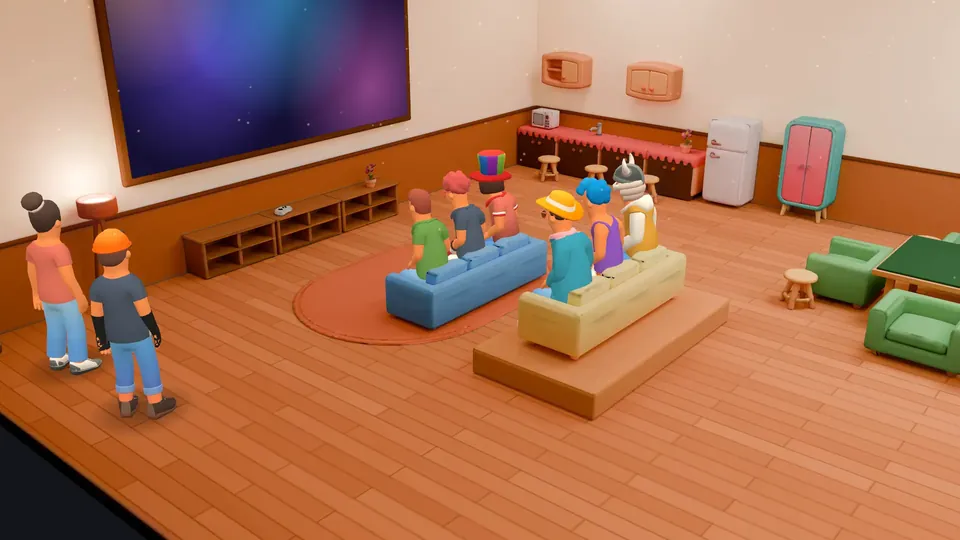
Gamers use Micup (micup.gg) as a free voice chat app for their squad: a server with voice channels capped at team size, a text channel for finding teammates, and screen sharing to show a match. Between matches, a voice channel can open as a 3D room on a computer, where the group sits down at a table for okey, chess, backgammon or draughts and keeps talking.
Last updated:
Which channels should a gaming server have?
| Channel | Type | What it is for |
|---|---|---|
| announcements | Text | Patch notes, events and server news. Turn off "Send messages" for everyone so only staff post. |
| looking-for-group | Text | Post your game, rank, role and when you can play, then mention the LFG role for that game. |
| clips | Text | Clips and screenshots. Free accounts upload up to 25 MB per file, Plus accounts up to 500 MB. |
| tournament-bracket | Link | A shortcut in the channel list to your bracket or stats site. |
| Squad 1, Squad 2 | Voice | Set the participant limit to your team size so the channel holds one squad. |
| Comms | Voice | Turn off "Use voice activity" so everyone has to use push-to-talk during scrims. |
| Game night | Voice, Game Room theme | A 3D room with two game tables and a TV for screen shares. |
How do you run looking-for-group with roles?
Create a role per game, region or rank and switch on "Allow mentions for this role", so a post in looking-for-group can ping everyone who plays that game. "Show this role separately" lists those players in their own block in the member list.
Players can pick their own roles from a reaction role panel made with the Community bot. A panel can let people take several roles, keep only one (useful for regions), or add roles without removing them. The bot can also hand out levels, including XP for time in voice, and give roles as level rewards; #rank and #top show where someone stands.
Which voice settings matter during a match?
- Push-to-talk: in the desktop app it works system-wide, so you can talk with the game in focus. In a browser it only works while the Micup tab is focused.
- Noise suppression filters background noise from your mic under Settings › Voice & video.
- "Priority speaker" lets a shotcaller be heard over everyone while holding the priority push-to-talk key.
- "Move members" lets a captain drag players into the right team channel; "Mute members" mutes someone for everyone.
- A participant limit of up to 99 keeps squad channels from filling up with spectators.
How do you show your game to the squad?
Start a screen share in the voice channel; anyone with the "Stream video" permission can share a window, a screen or their camera. A free account shares at up to 720p and 30 fps, and a server boost can unlock higher options in that server.
Micup Plus adds a screen sharing option of up to 4K and 60 fps; actual quality depends on your connection and device. In a Game Room, Night Lounge or Coffeehouse 3D room, the shared screen also plays on the room TV.
What can a squad do between matches?
Sit down at a table in a 3D room and play Okey or 101 Okey with four players, or chess, backgammon, draughts or Turkish draughts with two. The server checks every move, so an illegal move is refused. Coffeehouse has three tables, Game Room two, and Night Lounge and Campfire one each.
Everyone at the table must be in that voice channel. Leaving before the end loses the game, a dropped connection has 30 seconds to come back, and up to 50 people can watch a table live.
What are the limits for gamers?
- Micup has no matchmaking. Finding teammates runs through your own channels and roles.
- 3D rooms and table games open only on a computer. The Android app and phone browsers join the same voice channel in the flat view.
- The 4K and 60 fps screen sharing option is a ceiling for Plus accounts, not a guaranteed quality.
Frequently asked questions
Can I use push-to-talk while I play?
Yes. In the Micup desktop app for Windows, macOS or Linux, push-to-talk works system-wide while your game has focus. In a browser it works only while the Micup tab is focused.
Is Micup free for a gaming server?
Yes. The server, voice channels, screen sharing, 3D rooms and table games are free. Micup Plus is an optional upgrade for one account, starting at USD 1.99 for a month.
How do I keep a squad channel to five people?
Open the voice channel settings and set the participant limit to 5. Once five people are in, the channel is full.
Can friends on a phone join the voice channel?
Yes, with the Android app or a phone browser they join the same voice channel and talk. They see the regular voice view, not the 3D room or the game tables.
What is a good voice chat app for gamers on PC?
Micup is a free voice chat app for PC with neural noise suppression that runs on your device and an in-game overlay on Windows.
Get Micup
3D rooms and table games open on computers, in the browser and the desktop app.