
How do study groups use Micup?
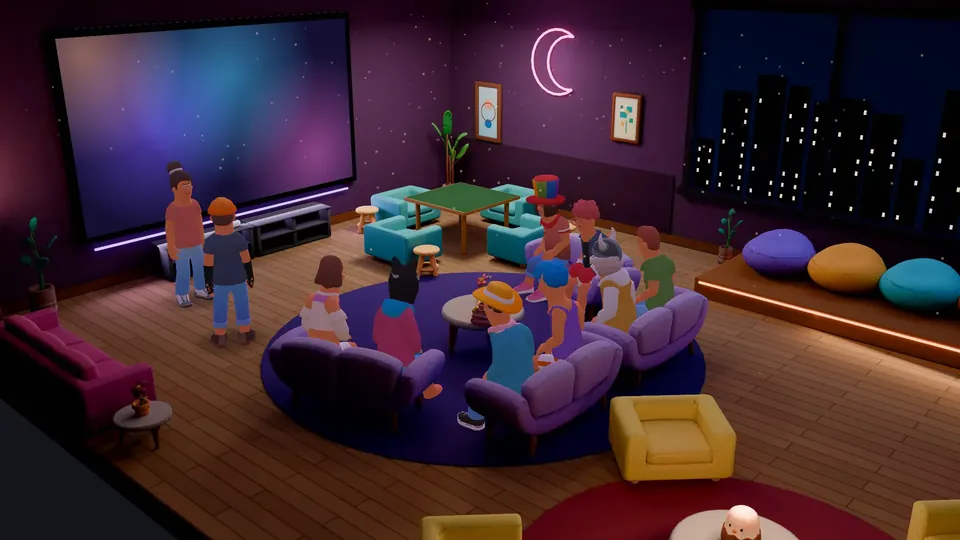
Study groups use Micup (micup.gg) as a virtual study room: a quiet voice channel where everyone works with push-to-talk, a second room for talking problems through, and screen sharing to walk the group through notes or an exercise. Text channels hold questions, files and summaries, and during a break the group can sit at a table in the 3D Coffeehouse room and play a quick game of chess.
Last updated:
Which channels should a study server have?
| Channel | Type | What it is for |
|---|---|---|
| schedule | Text | Session times and exam dates; pin the current week |
| questions | Text | One question per message so answers stay together; slowmode stops a flood before exams |
| notes | Text | Summaries with headings, lists and tables; pin the best ones |
| resources | Text | Files up to 25 MB on a free account, plus links to course pages |
| Focus room | Voice | Turn off "Use voice activity" so everyone must hold push-to-talk to speak |
| Discussion room | Voice | Open mic for working through a problem together and sharing screens |
| Break room | Voice, Coffeehouse theme | Three game tables and a TV in a 12-seat 3D room |
How do you keep a focus room quiet?
- In the Focus room channel settings, turn off "Use voice activity" for everyone. Without it, push-to-talk is required, so nobody's mic is open by accident.
- Turn on noise suppression under Settings › Voice & video to filter background noise for the times someone does speak.
- Give the group leader "Mute members" for the rare loud moment, and "Priority speaker" to be heard when announcing a break.
- Set a participant limit if the room is meant for a fixed group.
How do you explain something on screen?
Anyone with the "Stream video" permission can share a window, a whole screen or a camera in the voice channel. A free account shares at up to 720p and 30 fps, which is usually enough for slides and documents. In a 3D room with a TV, such as Coffeehouse or Night Lounge, the others press "Watch" on the TV and can enlarge it with "Full screen".
What can you write in study chat?
- Headings, bulleted and numbered lists, and quotes for clean summaries.
- Tables for comparing formulas, dates or definitions.
- Code blocks with syntax highlighting for more than 100 languages, for programming courses.
- Note, Tip, Important, Warning and Caution boxes to flag what will be on the exam.
- Messages of up to 2,000 characters on a free account and 4,000 with Micup Plus.
What can a study group do on a break?
Move to the Break room and sit at one of the Coffeehouse tables. Chess and both draughts games run on a total clock of 3, 10 or 30 minutes per player, so a quick game fits into a short break, and okey or backgammon work for longer ones.
What are the limits for study groups?
- Micup has no shared whiteboard and no built-in study timer; share your screen to show a whiteboard app or a timer.
- Micup accounts are for people aged 15 and over, or older where local law requires, and users aged 15 to 17 need a parent or guardian's consent.
- 3D rooms open only on computers. Members on the Android app or a phone browser join the same voice channels in the flat view.
Frequently asked questions
Can we study together in silence on Micup?
Yes. Turn off "Use voice activity" in the Focus room so everyone has to hold push-to-talk to speak. You stay connected and can see who is in the room without hearing every keystroke.
Can I share my notes on screen?
Yes. Start a screen share in the voice channel and pick a window or your whole screen. Screen sharing is free, at up to 720p and 30 fps on a free account.
Does Micup work for coding study groups?
Yes. Messages support code blocks with syntax highlighting for more than 100 languages, and you can share your editor on screen in a voice channel.
Is Micup free for students?
Yes. Servers, voice channels, screen sharing and the 3D rooms are free. Accounts are for people aged 15 and over, or older where local law requires.
Get Micup
3D rooms and table games open on computers, in the browser and the desktop app.