
How do friend groups use Micup?
Friend groups use Micup (micup.gg) to hang out online: a group chat for everyday messages and calls, and a small private server whose voice channel opens as a 3D room where everyone sits together as avatars. In that room you can talk around the Campfire, play okey or backgammon at a table, or watch one friend share their screen, for free in the browser or the desktop app.
Last updated:
Group chat or server: which does a friend group need?
Most friend groups use both. A group chat is the quick place for messages and calls. A server adds several voice channels, roles and the 3D rooms, because 3D rooms open only in server voice channels.
| What you want | Group chat | Small server |
|---|---|---|
| Messages, photos and voice or video calls | Yes | Yes |
| Screen sharing | Yes | Yes |
| Several voice rooms at once | No | Yes |
| 3D rooms with avatars | No | Yes, on a computer |
| Okey, chess and backgammon tables | No | Yes, inside 3D rooms |
What does a simple friend server look like?
To keep the server among friends, create invite links with "Expire after" and "Max number of uses" set, and make any channel private so only the members and roles you pick can see it.
| Channel | Type | What it is for |
|---|---|---|
| general | Text | Everyday chat, memes and links |
| plans | Text | Pick a date for the next meetup; react with emoji to vote |
| photos | Text | Trip photos and screenshots, up to 25 MB per file on a free account |
| Hangout | Voice, Campfire theme | 40 seats around a fire, with fireflies and one game table |
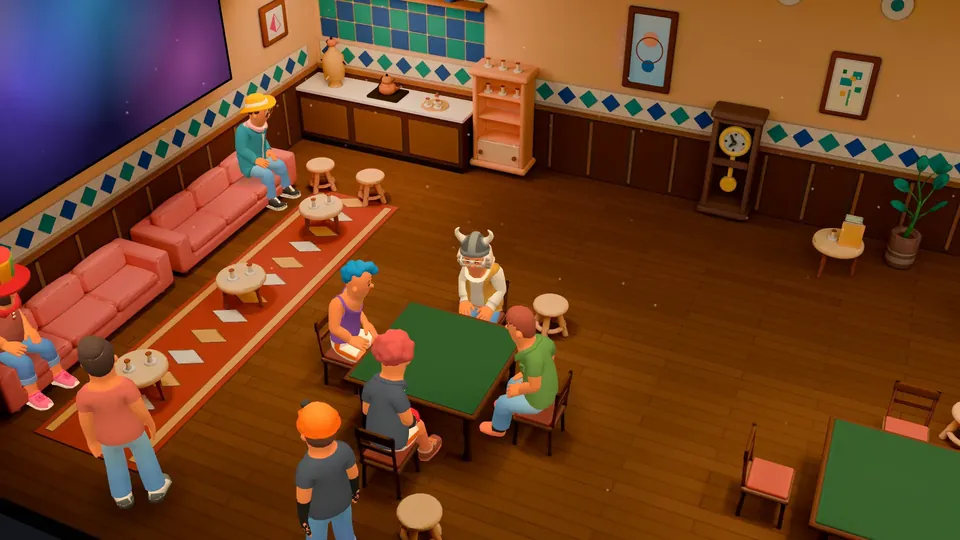
| Game table | Voice, Coffeehouse theme | Three game tables for okey, backgammon or chess nights |
| Movie night | Voice, Cinema theme | 54 seats and a big screen for one friend's screen share |
What can you do together in a 3D room?
Everyone joins with a free default look. All 80 faces, some hairstyles and five moves are free; other outfit parts cost USD 0.99 each in the shop and costumes USD 1.99.
- Sit down in a free seat, or walk with WASD and run with Shift; walking is on while the room has 32 people or fewer.
- Press E next to a seat to sit or stand, and V to see the room through your character's eyes.
- Wave, dance, jump or faint with the free moves, and send emoji reactions that pop up over your character.
- Type in the room chat box; your message shows as a speech bubble over your character, up to 120 characters.
- Talk normally. With "3D audio" on, each friend's voice comes from where they sit. When someone walks away their voice gets up to 9 dB quieter, but nobody becomes inaudible.
Which games can friends play in a 3D room?
Click a free seat at a table, pick the game and the move time, and press "Set up table"; friends press "Take seat" and the game starts when every seat is taken. Others can watch from the spectator seats.
| Game | Players |
|---|---|
| Okey | 4 |
| 101 Okey | 4 |
| Backgammon | 2 |
| Chess | 2 |
| Draughts | 2 |
| Turkish draughts | 2 |
How do friends watch something together?
One friend starts a screen share in the voice channel and everyone else presses "Watch" on the big screen in Cinema or on the TV in Night Lounge, Coffeehouse or Game Room. You talk the whole time. Only share what you have the rights to show; the Terms of Use treat sharing films or series without the rights as copyright infringement.
What are the limits for friend groups?
- 3D rooms and game tables need a computer. A friend on the Android app or a phone browser joins the same voice channel in the flat view.
- There is no built-in shared video player; watching together works through screen sharing.
- Most outfit parts beyond the free ones are paid.
- Everyone needs their own Micup account, and accounts are for people aged 15 and over, or older where local law requires.
Frequently asked questions
Do my friends need a Micup account?
Yes. When a friend opens your invite link, Micup asks them to sign in or create a free account, then adds them to the server.
Is hanging out on Micup free?
Yes. Group chats, calls, servers, 3D rooms and table games are free. You only pay if you want Micup Plus or extra outfit parts.
How many friends fit in the Campfire room?
Campfire has 40 seats and 21 standing spots. There is no 3D-specific cap on people; up to 48 characters are drawn and the rest show as profile pictures.
Do we need VR headsets?
No. 3D rooms run on a normal computer screen with mouse and keyboard, in the browser or the desktop app. Micup has no VR support.
Get Micup
3D rooms and table games open on computers, in the browser and the desktop app.