
How do work teams use Micup?
Teams use Micup (micup.gg) the way a community does: one server, text channels per project, voice rooms for quick calls and stand-ups, and roles that decide who can see and change what. Micup is a community chat app rather than a workplace suite: there is no business plan or team billing, and text messages are stored on Micup's servers without end-to-end encryption.
Last updated:
How should a team server be organised?
| Channel | Type | What it is for |
|---|---|---|
| announcements | Text | Team-wide news; only leads can post |
| general | Text | Everyday questions and chat |
| Project A (category) | Category | Groups the channels of one project |
| project-a-tasks | Text | Day-to-day work on the project; pin decisions |
| project-a-builds | Text | A webhook posts build or repository events here |
| leads | Text, private | Visible only to the Lead role |
| handbook | Link | A shortcut to your wiki or documentation |
| Stand-up | Voice | Daily calls; join with one click |
| Pairing | Voice | Two or three people sharing screens |
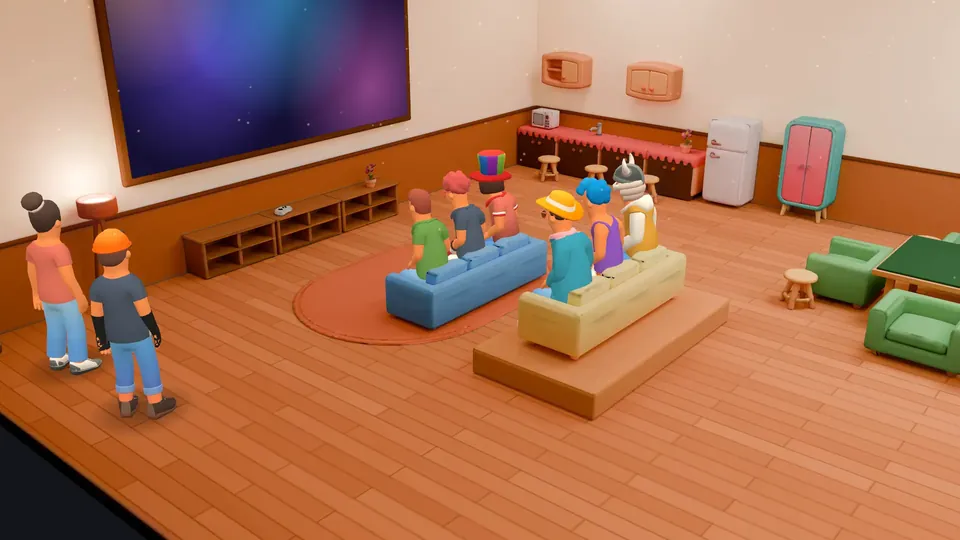
| Team social | Voice, Night Lounge theme | A 3D room with 20 seats and a game table for after hours |
How do roles and permissions control access?
Under Community settings › Roles, each role gets a name, a colour and its permissions, grouped as Community-wide, Messages & media, Moderation, Channel access, Audio & video and Channel management. "Show this role separately" lists a team in its own block of the member list, and "Allow mentions for this role" lets anyone ping it.
For one channel, "Manage permissions" sets overrides for roles or single members, which is how a private channel works. Someone with "Manage roles" can only edit roles below their own highest role. Keep "Administrator" for very few people; it grants every permission and skips channel restrictions. The Activity log shows changes and moderation actions, and Moderation can require two-factor authentication for moderation actions.
How do you run calls and stand-ups?
- Click a voice channel to join; there is no meeting link to send.
- Share a window, a screen or your camera. Free accounts share at up to 720p and 30 fps; Micup Plus adds an option of up to 4K and 60 fps, and actual quality depends on your connection and device.
- Noise suppression filters background noise, and push-to-talk works in the browser while the Micup tab is focused and system-wide in the desktop app.
- Voice and video calls are not recorded.
How do other tools post into Micup?
Create a webhook under Community settings › Webhooks (this needs "Manage webhooks") and choose its channel. Other tools send messages to the webhook URL. The same webhook also accepts GitHub's webhook format at the URL ending in /github, and a Slack-style format at the URL ending in /slack.
What is Micup not built for?
- There is no business plan, team billing or company account. Micup Plus is an upgrade for one personal account.
- Text messages are stored on Micup's servers and are not end-to-end encrypted, so under the Privacy Policy they can be accessed for moderation review, security incidents and lawful legal requests. Data in transit is encrypted with TLS.
- Voice rooms have an optional media protection mode, but it covers only the audio and video stream, not chat messages.
- Every member needs their own Micup account, and accounts are for people aged 15 and over, or older where local law requires.
- If your company has to meet specific compliance rules, read the Privacy Policy and Terms of Use before moving work conversations to Micup.
Frequently asked questions
Is Micup suitable for confidential work?
Be careful. Text messages are not end-to-end encrypted and are stored on Micup's servers. Voice and video calls are not recorded. Check the Privacy Policy against your own requirements first.
Can we keep some channels private to one team?
Yes. Create the channel as a private channel, or set permission overrides so only one role can see it.
Can GitHub post updates into a channel?
Yes. Create a webhook for the channel and give GitHub the webhook URL with /github at the end.
Is there a paid plan for teams?
No. Micup is free to use. Micup Plus is a personal upgrade that each member can buy for their own account, starting at USD 1.99 a month.
Get Micup
3D rooms and table games open on computers, in the browser and the desktop app.