
How do music communities use Micup?
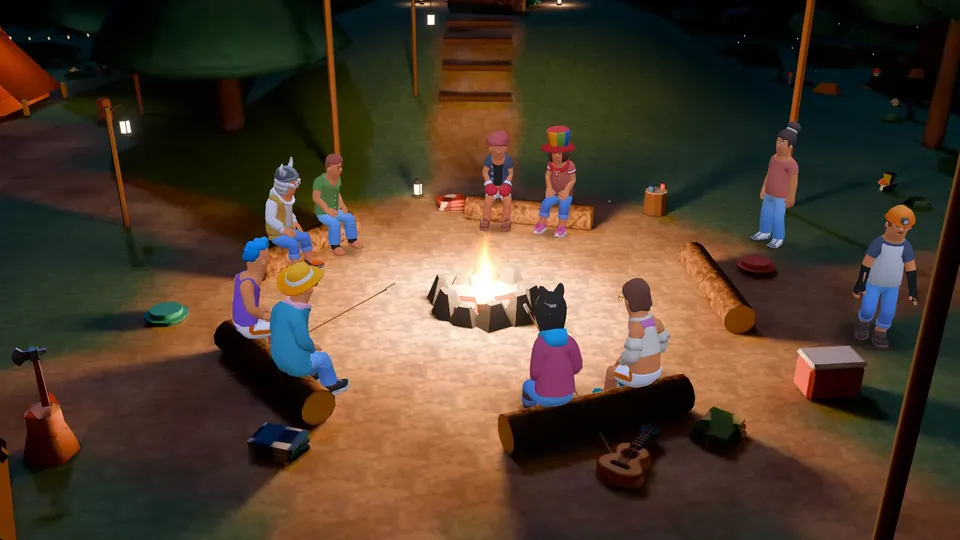
Music communities use Micup (micup.gg) to talk about music: text channels for new releases and feedback, voice rooms for listening sessions and late-night talk, and a 40-seat 3D Campfire room for big group conversations. Micup has no built-in music player or synced listen-along, so a track plays for the room through one member's screen share with audio, and only music you have the rights to share belongs there.
Last updated:
Which channels should a music server have?
| Channel | Type | What it is for |
|---|---|---|
| announcements | Text | Releases, shows and community news, posted by staff only |
| new-releases | Text | Members post what came out this week |
| feedback | Text | Share a demo as a file and get notes; slowmode gives each post room |
| gear-and-production | Text | Instruments, plugins, mixing questions |
| collabs | Text | Find a vocalist, producer or session player |
| Listening room | Voice | Raise the voice quality and let one person share audio |
| Studio talk | Voice | Musicians use the Direct input profile so instruments are not filtered |
| Campfire | Voice, Campfire theme | 40 seats for open conversations as avatars |
How good is the audio in a Micup voice room?
Each voice channel has a "Voice quality" setting, which needs the Manage channels permission to change. The default is 64 kbps and a regular server can go up to 96 kbps. Server boosts raise the ceiling: 128 kbps at boost level 1 (2 boosts), 256 kbps at level 2 (7 boosts) and 384 kbps at level 3 (14 boosts).
Your own mic processing matters as much. The recommended "Focused voice" profile cleans up speech. "Direct input" sends your audio untouched, which suits an instrument or a good microphone, and "Custom" lets you set noise suppression, echo cancellation and automatic gain control yourself.
Can you listen to music together on Micup?
Not with a built-in player. Micup has no music bot of its own and no feature that syncs playback across listeners. What works is a screen share with "Share stream audio" turned on; on some setups the app also offers "Capture entire system audio". Everyone in the channel then hears that stream live, and its quality depends on the sharer's connection and the channel settings.
Only share music you have the rights to. The Terms of Use count sharing music without the rights as copyright infringement.
Can a band rehearse over Micup?
Micup is built for talking, and we have not published latency figures, so we do not promise that it works for playing in time together. Bands use it to plan sets, talk through arrangements, swap demos as files (up to 25 MB on a free account, 500 MB with Plus) and listen back together.
How do roles and the Feed help a music community?
- A reaction role panel from the Community bot lets members pick genres or instruments, so the right people get pinged.
- Roles such as Artist or Producer can be shown separately in the member list and given their own colour.
- Artists can post releases to the Feed with up to four images or a poll, and their followers see them.
What are the limits for music communities?
- No synced listening and no built-in music player.
- Higher voice quality than 96 kbps needs a boosted server.
- 3D rooms open only on computers; on the Android app and phone browsers the voice channel uses the flat view.
Frequently asked questions
Does Micup have a music bot?
Micup has no built-in music player or music bot. To play something for the room, one person shares their screen with stream audio on, and only music they have the rights to share.
Will noise suppression ruin my guitar or vocals?
The default "Focused voice" profile is made for clear speech. To send an instrument or vocals as they are, switch to the "Direct input" profile under Settings › Voice & video.
What is the highest voice quality on Micup?
Up to 96 kbps on a regular server, and 128, 256 or 384 kbps on servers at boost level 1, 2 or 3.
Is a music server on Micup free?
Yes. Servers, voice channels, screen sharing and the 3D rooms are free. Boosts and Micup Plus are optional purchases.
Get Micup
3D rooms and table games open on computers, in the browser and the desktop app.